Flint: A Playful Display Font with a Rock-Formed Style
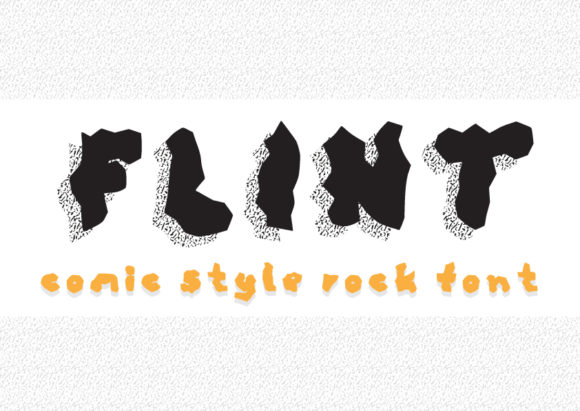
If you're looking to add a bold, playful touch to your creative projects, Flint is the font that might just be perfect for you. Designed to resemble letters smashed out of rock, Flint brings a sense of rugged charm and comic-style flair to any design. Whether you're working on logos, posters, t-shirts, or digital content, this display font can elevate your visuals in unexpected ways.
What Is Flint and Why It Might Interest You
Flint is a display font known for its unique, handcrafted look. It mimics the texture and roughness of stone, giving it a distinct feel compared to more polished typefaces. Its irregular shapes and dynamic lines make it ideal for projects that require a whimsical or edgy aesthetic.
Designers, bloggers, educators, and entrepreneurs may find Flint particularly useful when they want to stand out from the crowd. It's especially well-suited for branding, illustrations, and anything that needs a pop of visual interest without being too conventional.
Common Mistakes When Using Flint
While Flint can be a powerful tool, there are several common pitfalls that users often fall into. Understanding these can help you avoid unnecessary frustration and ensure your designs look their best.
Mistake 1: Overusing Flint in Small Text
One of the most frequent errors is using Flint for small text sizes, such as body copy or fine print. Because of its bold and uneven structure, Flint can become hard to read at smaller sizes. This can reduce the overall legibility of your content and lead to a poor user experience.
Better Approach: Reserve Flint for headlines, titles, or short phrases where its character can shine without compromising readability. Pair it with a clean, sans-serif font for body text to maintain balance.
Mistake 2: Ignoring Kerning and Spacing
Flint’s irregular letterforms mean that proper spacing is crucial. Many designers overlook the importance of adjusting kerning and tracking, which can result in awkward-looking text and an unprofessional appearance.
Better Approach: Always take the time to tweak the spacing between characters. Use design software tools like Adobe Illustrator or Photoshop to manually adjust kerning for better visual harmony.
Mistake 3: Not Checking Font Licensing
Before downloading or purchasing Flint, it's essential to understand the licensing terms. Some fonts come with restrictions on commercial use, while others may require attribution or payment for certain applications.
Better Approach: Always review the license agreement before using Flint in any project. If you’re unsure about the terms, reach out to the font provider or consult a legal expert if necessary.
What to Check Before Using Flint
To ensure that Flint works well for your specific needs, consider the following factors before making a decision:
- Project Type: Is Flint suitable for your intended use? It may not be the best choice for formal documents or websites that require a professional tone.
- Color Contrast: Make sure the color of the text contrasts well with the background to maintain readability.
- Font Pairing: Experiment with different fonts to see what complements Flint best. Sometimes a minimalist font can enhance the impact of a bold display font like Flint.
- File Format: Ensure you have the correct file format (e.g., OTF, TTF) that works with your design software.
Realistic Examples of Flint in Action
Let’s say you're designing a poster for a local music festival. Using Flint for the headline “Rock the Night” gives it an edgy, energetic vibe that aligns perfectly with the theme. In contrast, if you were creating a website for a law firm, Flint would likely be inappropriate due to its informal style.
Another example is using Flint for a children’s book cover. The playful and slightly chaotic look of the font matches the fun nature of the content, making it an excellent choice for attracting young readers.
How to Avoid Common Pitfalls
Here are some practical tips to help you use Flint effectively:
- Test It First: Before committing to Flint for a major project, test it in different contexts and sizes to see how it performs.
- Use It Sparingly: Limit Flint to key elements of your design to maintain focus and clarity.
- Stay Within Legal Boundaries: Always respect the font's licensing agreement to avoid potential issues down the line.
- Seek Feedback: Ask peers or colleagues for their opinions on how Flint looks in your design. Fresh eyes can spot issues you might have missed.
By keeping these points in mind, you can make the most of Flint while avoiding common mistakes that could undermine your creative vision.
Whether you're a beginner or an experienced designer, Flint offers a unique opportunity to bring personality and flair to your work. Just remember to use it wisely and thoughtfully, and you'll be able to create stunning, eye-catching designs that leave a lasting impression.